Seedance 3.0 AI Video Generator

Create on Seedance 3.0 with an idea or a picture. Make a character animation, a product clip, or a little story, then try new versions as you go.

Create now

Seedance 3.0 Features

Two core capabilities: multi-material input and precise editing.

01

Drop in images, video clips, and audio together. Seedance 3.0 gives each file its own job, such as the subject, the camera move, or the beat, and turns them into one finished video.

  • Mix images, video, and audio in a single prompt
  • People and products stay consistent across shots
  • Audio sets the rhythm and the voice-over

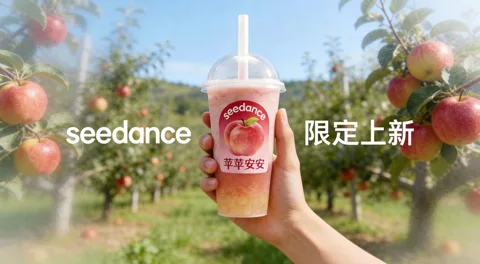
Example: 2 images + 1 video + 1 audio track → an 8-second first-person fruit tea ad

02

Point to one thing in your video, like a product, an outfit, a person, or the background. Seedance 3.0 changes only that and keeps the motion, light, and camera work as they were.

  • Swap products, people, or outfits
  • Original motion and camera path stay the same
  • No need to regenerate the whole clip

Example: 1 source video + 1 packaging image → every bag in the clip replaced

Your inputs

Image 1
Image 1
Image 2
Image 2
Video 1
Video 1

Seedance 3.0 result

Turn your ideas into videos with Seedance 3.0

Make a character animation, a product ad, or a short story. Start with your ideas and pictures.

Bring your characters to life

Upload a character image to Seedance 3.0 and describe what it should do. Send a little hero through a forest, make a robot dance, or create an opening scene for your game. See your idea in motion, then work on the actions and details.

Game trailersCharacter testsAnimated shorts

Create visuals for your music

Think of scenes that fit your song: a rainy street, a sunset by the sea, or a stage full of lights. Use words and reference pictures in Seedance 3.0 to make clips for a song preview, a show, or a social post. Start with your favorite scene.

Music videosLyric visualsArt loops

Turn product photos into ads

Upload a product photo to Seedance 3.0 and describe how you want to show it. Move the camera around a pair of shoes, or show steam rising from a cup of coffee. Try different scenes for your shop and social pages. Check the product details before you post.

Product demosSocial adsStore videos

Bring a short story to the screen

Start with something simple, like a kitten’s first trip outside. Describe the character, the place, and what happens. Turn key moments into videos with Seedance 3.0 to test a film idea, show your picture book, or tell a story in class.

Short filmsMini dramasStory pitches
Features

What can you do on Seedance 3.0?

Go from your first sentence to a video you can save, one simple step at a time. Available features depend on the model you choose.

Write the way you talk

Describe your scene in Seedance 3.0: who is there, where they are, and what they do. Try “a kitten chasing a butterfly in a garden.” Add the weather, colors, or a note like “move the camera closer” to make the scene more specific.

Text to video

Make a photo move

Upload a clear picture to Seedance 3.0 and describe the movement you want. Make a drawn character wave, or move the camera toward a bunch of flowers. The picture gives AI a starting point. Your words describe what happens next.

Image to video

Add sound to the scene

Want footsteps, rain, or someone speaking? Choose a model that supports sound and include it in your description. Start with a simple scene, then listen to the result to check that the sound fits the action and mood.

Video with sound

Try a different look

Try the same story in Seedance 3.0 as a cartoon, a clay animation, or a movie scene. Describe the look you want, or add an example picture in a mode that supports image references. Compare a few versions to find the right feel.

Visual styles

Change a detail and try again

Is the background too dark, or the action not quite right? Change your description and make another version. To work on an existing clip, choose a model with video editing, upload the video, and explain what you want to change.

Changes and edits

Choose a size and save

Choose a tall video for a phone screen or a wide one for a larger scene. Check your model’s length and quality options before you start. When the video is ready, preview it and download the version you like.

Size and download
Use cases

Who is Seedance 3.0 for?

Start with a small idea, whether you need a video for work or just want to try something fun. Here are a few ways to use it.

Content creators

Turn a fresh idea into your next post with Seedance 3.0. Try a travel scene, a pet story, or an opening clip for your channel. Make one short video first, then decide whether to build more posts around the idea.

Short videos and social posts

Marketing teams

Try a few openings and backgrounds for the same product. Make short versions so your team can compare the scenes and messages. Choose a direction together before working on the details of the ad you plan to run.

Ad ideas

Shop owners

Start with photos you already have and create a product video in Seedance 3.0. Show your product on a desk, in a room, or outdoors. Before you post, check its shape, colors, and logo so the video gives shoppers the right idea about what you sell.

Product videos

Designers and studios

Make a moving draft in Seedance 3.0 to discuss with a client. Use a short scene to show the colors, mood, and camera direction you have in mind. Before a full shoot or production, check that everyone is picturing the same thing.

Creative drafts

Teachers and trainers

Show a simple scene, like a seed growing or rain falling, to introduce a lesson. Use the clip to ask a question and explain the idea behind it. Check the content first so it supports what you are teaching.

Classroom stories

Anyone with an idea

Make a birthday greeting, animate an animal you drew, or create a clip from a bedtime story. You do not need a complete plan to begin. Start with one sentence, watch the result, and add more details as you go.

Fun and personal projects
How it works

Get started with Seedance 3.0 in 3 steps

All you need to begin is an idea. Try one simple scene first, then explore more as you learn.

  1. 01
    Step 01

    1. Describe your idea

    Describe your idea in Seedance 3.0: who is there, where they are, and what happens. Add a reference picture if you want a certain character or product. Use a clear image with a subject that is easy to see.

  2. 02
    Step 02

    2. Choose settings and generate

    In Seedance 3.0, pick a model, video length, and shape. Check the credit cost, then click Generate. The options depend on your model, so use the settings shown in the panel.

  3. 03
    Step 03

    3. Watch and download

    Check the movement, picture, and sound. Download the video if you like it, or change your description and try again. You can also find past work in your Seedance 3.0 generation history.

What People Say About Seedance 3.0

Creators, shop owners, and teams share their video-making experiences.

1M+
Creators
40M+
Videos created
180+
Countries
4.9/5
Avg. rating
Hannah Larsson, YouTube travel creator
Hannah Larsson
YouTube travel creator

I added ten photos from my trip and one song.

Marcus Bell, Music producer
Marcus Bell
Music producer

I dropped my track into Seedance 3.0 and asked for a night city vibe.

Amara Okafor, Children's book author
Amara Okafor
Children's book author

My characters finally move. Seedance 3.0 kept my drawing style and the faces of my two little heroes.

Tom Reilly, Coffee shop owner
Tom Reilly
Coffee shop owner

I took three photos of our latte and asked Seedance 3.0 for a cozy morning ad. The steam, the cup, the sound of the shop, all there.

Priya Nair, Wedding planner
Priya Nair
Wedding planner

I show couples a short mood video of their wedding theme before the big day. Seedance 3.0 makes it simple, and couples say yes faster.

Hannah Larsson, YouTube travel creator
Hannah Larsson
YouTube travel creator

I added ten photos from my trip and one song.

Marcus Bell, Music producer
Marcus Bell
Music producer

I dropped my track into Seedance 3.0 and asked for a night city vibe.

Amara Okafor, Children's book author
Amara Okafor
Children's book author

My characters finally move. Seedance 3.0 kept my drawing style and the faces of my two little heroes.

Tom Reilly, Coffee shop owner
Tom Reilly
Coffee shop owner

I took three photos of our latte and asked Seedance 3.0 for a cozy morning ad. The steam, the cup, the sound of the shop, all there.

Priya Nair, Wedding planner
Priya Nair
Wedding planner

I show couples a short mood video of their wedding theme before the big day. Seedance 3.0 makes it simple, and couples say yes faster.

50% OFF

You unlocked a special launch discount!

Ends in
00H
:
00M
:
00S

Seedance 3.0 Pricing: Plans & Credits for Every Creator

Cancel anytime

Lite
50% OFF

0.025 / credit

$39.9$14.9

$178.8 billed yearly· Save $300

600 credits/month
Video Models
Seedance logoSeedanceMiniMax logoMiniMaxWan logoWanKling logoKlingGrok Imagine logoGrok ImagineVeo logoVeo
Image Models
Seedream logoSeedreamNano Banana logoNano BananaGPT Image logoGPT Image
  • Text-to-video & image-to-video
  • Audio generation on supported models
  • 1080p video on supported models
  • Customer support
  • Commercial use license
Pro
50% OFF

0.014 / credit

$99.9$49.9

$598.8 billed yearly· Save $600

3,600 credits/month
30% off Seedance models
Video Models
Seedance logoSeedanceMiniMax logoMiniMaxWan logoWanKling logoKlingGrok Imagine logoGrok ImagineVeo logoVeo
Image Models
Seedream logoSeedreamNano Banana logoNano BananaGPT Image logoGPT Image
  • Text-to-video & image-to-video
  • Audio generation on supported models
  • 4K video on supported models
  • Customer support
  • Commercial use license
Max
50% OFF

0.012 / credit

$199.9$99.9

$1,198.8 billed yearly· Save $1,200

1x
1x2x3x4x5x
8,000 credits/month
30% off Seedance models
Video Models
Seedance logoSeedanceMiniMax logoMiniMaxWan logoWanKling logoKlingGrok Imagine logoGrok ImagineVeo logoVeo
Image Models
Seedream logoSeedreamNano Banana logoNano BananaGPT Image logoGPT Image
  • Text-to-video & image-to-video
  • Audio generation on supported models
  • 4K video on supported models
  • Customer support
  • Commercial use license
FAQ

Seedance 3.0 questions and answers

Quick help with uploads, videos, and credits. Still have a question? Contact support@seedance3.si.

Email support support@seedance3.si
Start now

Bring your idea to life on Seedance 3.0

Start with a sentence or a photo. Make one scene you would love to see, preview the result, and save your favorite version.

  1. 01Describe a simple idea
  2. 02Add your own reference pictures
  3. 03Generate, preview, and download
Seedance 3.0 AI Video Generator: Make Videos from References